

Typst 0.15.0 (June 15, 2026)
This section documents all changes to the Typst language and compiler between Typst 0.14.2 and 0.15.0. If you are migrating an existing document to Typst 0.15, make sure to check out the Migration guide. It walks you through changes you may need to make to your existing documents to ensure compatibility with Typst 0.15.
Highlights
- Typst now supports variable fonts
- HTML export now supports equations out of the box via MathML
- With the new, experimental bundle export target, a single Typst project can output multiple files (e.g. a multi-page website)
- A single document can now contain multiple bibliographies
- Typst can now target multiple PDF standards at once
- The new
withinselector simplifies many introspection use cases - The new
dividerelement represents a thematic break that templates can style - Spot colors enable use of custom pigments in offset printing
- With the new file
pathtype, project-relative paths can be passed to packages - The new, more general
typst evalCLI subcommand supersedestypst query - Layout convergence issues now result in detailed diagnostics
- Two long-standing list layout issues with marker alignment and centering were fixed
- Paragraph handling in HTML export is improved, preventing unexpected paragraphs from appearing
- This documentation now has a print version
Language
Syntax
- File paths (e.g. in imports or
imagefunction calls) may not contain backslashes anymore; instead forward slashes must be used (Breaking change)
 - Added hints for invalid characters in code mode
- Added hint when trying to use a unary operator directly in an embedded expression using a hash (e.g.
#-30deg) - Fixed potential stack overflow crashes by enforcing a maximum parsing depth
- Fixed incremental parsing of unclosed strings
Styling
- Text show rules now have tracebacks that include the matched text
- Fixed a crash with text show rules that match on multi-character symbols
Scripting
- Extended hint when built-in definitions are shadowed to set and show rules
- Added hint when trying to spread one or multiple dictionaries into an array
- Improved diagnostics for invalid method calls
- Improved hint for unknown variables in math that are available in
std - Fixed a misleading error message when trying to assign to a temporary return value
Library
Foundations
Added file
pathtype that is now accepted in all places where paths were previously only represented as strings- A path constructed in one file can be used in another file, but will be resolved relative to its original file
- Likewise, paths can be passed across package boundaries
- The initial path type is very minimal, but additional features like file existence checks or directory walking are planned
Collections
- Added
mapandfilterfunctions on dictionaries and arguments - Named arguments on
argumentsvalues are now accessible with field access syntax - The
slicefunctions on strings and arrays will now error if passing both anendand acount (Minor breaking change) - Added
inclusiveparameter torangefunction
- Added
Calculation
- Added
asinh,acosh,atanh, anderffunctions tocalcmodule - Added
int.minandint.maxconstants for the minimum and maximum representable integer, respectively - Fixed behavior of
quofor negative integers - Fixed potential overflows in
norm,abs,gcd, andlcm - Floating-point calculations are now consistently deterministic across platforms
- Added
Date & time handling
- The
offsetparameter ofdatetime.todaynow accepts durations as an alternative to integers, allowing for sub-hour precision offsets - Addition and subtraction of datetimes and durations now retains precision instead of clamping to full days in some cases
- The
datetimeconstructor now emits more precise errors when components are missing
- The
Conversions
- Added
baseparameter tointconstructor to configure in which base to parse a string - Fixed that the
baseparameter of thestrconstructor was accepted for non-integer values if its value was10 (Minor breaking change) - Added hint when trying to construct a string with base 1
- Added
- The
panicfunction now displays strings as-is instead of showing theirrepr, making it more suitable for friendly, user-facing messages - Changed
reprof styles and locations to be more distinct
Model
- Added
dividerelement representing a thematic break that templates can style Bundle-related elements
Bibliography management
- A single document can now contain multiple bibliographies
- Added
targetparameter tobibliographyelement to configure which citation is picked up by which bibliography - Added
groupparameter tobibliographyelement to configure how numbers are shared/reset across bibliographies - Added support for numeric values for the
monthkey in.bibfiles - Added support for BibLaTeX name options in
.bibfiles - Added support for propagating non-numeric
volumefields in.bibfiles to bibliographies - Improved sorting in bibliographies to take into account language conventions
- Improved interoperability with CSL styles; for a full listing of changes, review the Hayagriva 0.10.0 changelog
- Added support for setting directors on videos without a parent in Hayagriva YAML files
- Improved handling of
Anthosentries in Hayagriva YAML files by treating them aschapters in CSL
- A single document can now contain multiple bibliographies
Footnotes
- The link of a
footnoteis now within the superscript instead of around it, improving PDF tagging and HTML output - The thickness of the default footnote separator is now specified in font-relative instead of absolute units
- The link of a
Numbering
- The
par.first-line-indentproperty will now fold, meaning that partial dictionaries across different set rules orparcalls are combined Added
list.marker-alignproperty for defining how to align list markers- When omitted, it will default to the new baseline alignment (vertically), combined with
endalignment (horizontally)
- When omitted, it will default to the new baseline alignment (vertically), combined with
Text
Added support for variable fonts
- The well-known variation axes
ital,slnt,wght,wdth, andopszare automatically set based on textweight,stretch,style, andsize - Custom variations can be configured via the new
variationsparameter of thetextfunction - When using a variable font with Typst, the suffixes “Variable”, “Var”, and “VF” should be omitted as Typst trims them to unify static and variable fonts into a single family (Minor breaking change)
- The well-known variation axes
Font features
- The
text.alternatesparameter now accepts an integer in addition to a boolean to select stylistic alternates other than0and1 - Parsing of tag names in
text.featuresis now more strict (Minor breaking change)
- The
- Fixed that
context text.fontdid not reflect thecoversfield - Fixed uneven CJK-Latin spacing in justified paragraphs
- Fixed a bug where the
loremfunction would not produce the exact number of requested words - Improved translations for Swedish , Portuguese , Czech , Latvian , Slovak , Polish , Vietnamese , Finnish , and Welsh
- Added font exception to avoid SimSun-ExtB being incorrectly merged with SimSun
Updated New Computer Modern fonts to version 8.1.0
- This update changes the default look of calligraphic letterforms in the math font; the previous style can be restored through
show math.equation: set text(stylistic-set: 6)
- This update changes the default look of calligraphic letterforms in the math font; the previous style can be restored through
Updated Unicode components
- In particular, this fixed an issue with linebreaking of guillemets
Math
Layout
- Improved layout of under/over elements like
underbrace - Slightly improved spacing around
math.opelements - In which situations cramped styles (with tighter spacing) are applied is now fully consistent with TeX and MathML Core
- The
sizeparameter of thelrfunction now consistently applies to middle delimiters in the same way it does to outer delimiters - The
sizeparameter of thelrfunction now resolves relatively to the height of just the inner content; it does not take the delimiters into account anymore (Minor breaking change) - Glyph stretching is now always relative to the base glyph rather than a potentially already scaled version (e.g. due to display sizing) (Minor breaking change)
- Fixed left/right alignment not being applied correctly due to spacing next to alignment points
- The
binomelement now uses different OpenType constants for layout; though this does not lead to visible changes with most fonts - The default length and stroke width of
math.cancellines is now specified in font-relative instead of absolute units - Fixed potential misalignment in
casesfunction
- Improved layout of under/over elements like
Text handling
- Improved handling of multi-character symbols in math
- Fixed that some glyphs did not stretch correctly in script sizes
- Fraction, root, and under/over lines now respect
text.stroke - Accents in math are now always rendered in front of their base if they overlap
- Improved handling of multi-character symbols in math
- The
classfunction now applies the class only to its direct body rather than recursively (Minor breaking change) - More delimiter symbols (e.g.
chevron.l) are now callable to produce anlrelement (Minor breaking change) - Fixed various bugs with rendering of mathematical expressions that look like function calls but in reality aren’t (e.g.
$pi(1, 2)$, sincepiis not a function) - Fixed a bug with ordering of primes and nested attachments
Symbols
- Added many new symbols and variants. View the
codex0.3.0 changelog for a full listing.
Layout
Baseline information is now retained in many more parts of the layout engine
(Breaking change)- In particular, text contained in a
boxwith an inset is now aligned with the text surrounding thebox - This also fixes a bug where wrapping an inline equation in a
boxwould shift its baseline - Similarly, using a
blockin an equation will keep the baseline intact - Last but not least, the marker/number and item of a
listorenumare now properly baseline-aligned with the first line of the item even if the item is vertically larger than a normal line
- In particular, text contained in a
- Centering something in a list now centers based on the full available width rather than based on the maximum width of other list content
Page layout
- Added
bleedparameter topageelement to set up bleed margins - Fixed the size of
"us-executive"paper - Added warning for
show pagerules as they are unsupported
- Added
Paragraph layout
- Fixed a bug where justified text could accidentally protrude into the margin when it ends with certain kinds of characters (e.g. a zero-width space)
- Fixed a bug where first-line indent was applied at the start of a column even if
all: falseis set
- Fixed a bug where justified text could accidentally protrude into the margin when it ends with certain kinds of characters (e.g. a zero-width space)
- Added support for spacing that is both weak and fractional
Visualize
- Added support for spot colors (also called separation colors)
Tilings
- Added
offsetparameter for shifting the starting position of a tiling - Fixed parent-relative placement for
stackandpolygon
- Added
Gradients
- Fixed various bugs with rectangle strokes in combination with radii
- Fixed a potential deadlock with font fallback in SVGs
Various improvements to SVG image handling (see the resvg 0.46 and 0.47 changelogs); in particular:
- Added support for SVGs without top-level
xmlnsattribute - Added support for variable fonts in SVG using the
font-variation-settingsCSS property
- Added support for SVGs without top-level
Various improvements to PDF image handling (see the commits between
d0b540fand3483462on hayro); in particular:- Added support for JPEG2000 (
JPXDecode) and JBIG2 (JBIG2Decode) images - Improved parsing robustness for non-compliant files
- Added support for blend modes
- Added support for JPEG2000 (
Introspection
- Layout convergence issues now result in detailed diagnostics that help pin down the cause
- Added
withinselector that matches elements that are contained within any elements matching an ancestor selector - Added
atparameter tocounter.displayfunction - Improved how
counter.displayauto-selects the numbering to use
Data Loading
- Added support for namespaces to
xmlfunction - Added hint when trying to read from a path that looks like a URL
- Diagnostics for binary file loading failures now include file paths
- The
jsonfunction now emits a friendly error when the loaded JSON has a leading UTF‑8 BOM
Export
Bundle
Added new, experimental bundle export target
- With bundle export, you can emit multiple output files from a single Typst project
- Bundles can contain any combination of HTML pages, PDFs, PNGs, SVGs, and arbitrary assets
HTML
Mathematical equations are now automatically exported to MathML (thanks to @mkorje)
- MathML defines how to render an equation, but also preserves its semantics
- If you’ve previously relied on show rules that use
html.frameto render equations to SVG, try MathML output. Switching to it will improve the accessibility of your document (though rendering will be somewhat less consistent across browsers).
The
boxandblockelements’ purpose is now aligned with paged export (Breaking change)The rules of how paragraphs are grouped in HTML have been adjusted to fix cases where paragraphs would appear unexpectedly
(Breaking change)- The list of HTML elements that can be grouped into paragraphs was tweaked (it now includes all phrasing content with the exception of elements that default to
display: none) - This default can be controlled by wrapping an element in a
boxorblockas appropriate - HTML elements that cannot be part of paragraphs (like a
<div>) do not immediately force adjacent inline-level Typst content to be wrapped in a paragraph; rather, they are considered neutral for paragraph grouping - Paragraph creation is only forced by block-level Typst elements (as opposed to HTML elements). Built-in block-level elements like headings or images wrap the HTML elements they create in
blockelements to force adjacent inline content into paragraphs. Package authors should do the same to ensure paragraph creation is consistent between HTML and paged export.
- The list of HTML elements that can be grouped into paragraphs was tweaked (it now includes all phrasing content with the exception of elements that default to
- The
targetfunction can now be used without thehtmlfeature flag (the rest of HTML export remains feature-flagged) DOM structure and built-in show rules
- The root
<html>element now receives alangattribute respecting what was configured fortext.lang - The Typst
imageelement now always emitswidthandheightattributes on the generated HTML<img>element - Code in
<pre>tags will now prefer raw newlines over<br>elements to encode line breaks - Fixed generated HTML for quote attributions
- Fixed table cell show rules not working in HTML export
- The root
Serialization
- HTML is now minified by default; use the
--prettyCLI flag or the checkbox in the web app to pretty-print it
- HTML is now minified by default; use the
HTML elements
- The
attrsparameter onhtml.elemwill now fold, meaning that partial attributes across different set rules orhtml.elemcalls are combined html.scriptandhtml.styleonly accept a string and not arbitrary content anymore (Breaking change)
- The
Whitespace handling
- HTML
<br>elements now collapse adjacent Typst spaces - Fixed spans being emitted to protect whitespace from collapsing unnecessarily in some cases
- HTML
- Typst can now target multiple (compatible) PDF standards at once, e.g. PDF/UA-1 and PDF/A-2a
- PDFs are now a bit more space-optimized at the cost of being harder to inspect with a text editor; use the
--prettyCLI flag or the checkbox in the web app to pretty-print them - Labelled headings now result in named destinations even if they are not referenced
Graphics
- Added support for more compositing features of COLRv1 fonts
- Fixed rendering of gradients in LinearRGB, CMYK, and Luma color spaces
- Fixed excessive sampling of linear gradients
- Added support for more compositing features of COLRv1 fonts
Tagging
- Added support for more specific artifact kinds in
pdf.artifact; these are now internally used when appropriate - Fixed “invalid document structure” errors with complex list markers
- Fixed wrong PDF tagging order for inline content outside of paragraphs
- Fixed bounding box computations for stroked shapes in tagged PDFs
- Added support for more specific artifact kinds in
Standards compliance
- Fixed potentially incompliant PDF files by emitting an error when PDF/UA-1 is requested but complying with PDF/UA-1 would require newer features than available in the current PDF version
- Fixed potentially incompliant PDF 1.4 files by emitting errors when implementation limits are exceeded
- Fixed potentially incompliant PDF files by emitting an error when PDF/UA-1 is requested but complying with PDF/UA-1 would require newer features than available in the current PDF version
SVG
- SVGs are now minified by default; use the
--prettyCLI flag or the checkbox in the web app to pretty-print them - Somewhat reduced the size of generated SVGs
- SVG elements do not have the classes
typst-frame,typst-doc,typst-group,typst-shape, andtypst-textanymore (Minor breaking change) Graphics
- Fixed a bug where tilings could be incorrectly reused in multiple places
- Fixed rendering of gradients in LinearRGB, CMYK, and Luma color spaces
- Fixed handling of conic gradient angles
- Fixed excessive sampling of linear gradients
- Fixed a bug where tilings could be incorrectly reused in multiple places
- Fixed positioning and sizing of color bitmap glyphs
- Fixed sources of non-determinism in SVG export
PNG
- Fixed handling of conic gradient angles
- Fixed positioning and sizing of color bitmap glyphs
- Fixed that negatively scaled text with equal
xandyscale would turn invisible in PNG export
Command Line Interface
- Added new
typst evalsubcommand to evaluate a Typst code expression from the CLI; this command supersedestypst query - Tracebacks for diagnostics are now more compact and readable
- Added
--prettyflag for producing human-readable output; output is otherwise minified by default (applies to HTML, SVG, and PDF, but not PNG) Fonts
- The output of
typst fonts --variantsis now more readable and informative; in particular, it also displays the paths of font files and, for variable fonts, variation axes - The CLI now discovers fonts lazily, saving time on operations that do not need fonts (like HTML export without frames)
- Adobe Creative Cloud fonts are now discovered as system fonts
- The output of
Dependency output
- When writing to stdout while using
--deps-format make(which is incompatible and thus fails), no empty Make dependency file will be emitted anymore - The JSON dependency format now includes information about outputs in addition to inputs
- When writing to stdout while using
Path handling fixes on Windows
- Reading from a path that contains a drive letter now results in an explicit error instead of the drive letter being silently ignored
- Attempting to read from a path that contains a reserved filename (like
COM1) now results in an explicit error
- Non-Unicode input paths are not supported anymore (Breaking change)
- The experimental
--timingsargument now requires an explicit file name instead of defaulting torecord-{n}.json (Breaking change) - Added colors to
--help/-handtypst infooutput - Fixed inconsistency in environment variable handling between
typst infoandtypst compile - Fixed a bug with the injection of a live reload script when using
typst watchwith HTML export - Fixed a bug where local timezone information was taken into account even if a fixed date is set via
--creation-timestamporSOURCE_DATE_EPOCH, leading to irreproducible results
Tooling
Syntax highlighting
- In math, parentheses used for grouping are now highlighted differently than ones intended for display
- In math, parentheses used for grouping are now highlighted differently than ones intended for display
Autocomplete and tooltips
- Autocompletion and tooltips are now aware of parameters of user-defined functions
- Autocomplete descriptions and tooltips for font families are now more detailed and, for variable fonts, include variation axes
- Function autocompletions in math mode now always prefer round parentheses over square brackets (which are not supported in math)
- Fixed autocompletion and tooltips not working with argument lists in math mode
- Autocompletion and tooltips are now aware of parameters of user-defined functions
Deprecations
- Certain unclear/ambiguous ways to write a raw language tag; these will now emit a warning in anticipation of an upcoming change to how they are parsed
- Fallback to Arabic numerals for
numberingsystems that do not support the number zero (e.g. for"⓵") - Various symbols were renamed, see the deprecation section in the dedicated changelog for a full listing
Some citation styles that were renamed or superseded
council-of-science-editorsis now calledcse-citation-sequence-brackets-8th-editioncouncil-of-science-editors-author-dateis now calledcse-name-yearmodern-language-association-8/mla-8is superseded bymodern-language-association/mlavancouveris now callednlm-citation-sequencevancouver-superscriptis now callednlm-citation-sequence-superscript
- Undocumented array forms of
enumandtermsitems
Removals
- The
pathelement, usecurveinstead (Breaking change) - The
patterntype, usetilinginstead (Breaking change) - The
pdf.embedelement, usepdf.attachinstead (Breaking change) - The scoped functions
cbor.decode,csv.decode,json.decode,toml.decode,xml.decode,yaml.decode, andimage.decode; directly passbytesto the top-level functions instead (Breaking change) - Various previously deprecated symbols, see the removals section in the dedicated changelog for a full listing (Breaking change)
Development
- The
typst-kitcrate was completely reworked to make it easier to create a TypstWorldimplementation - Diagnostic hints can now have spans (though typically they will be detached, which just means there isn’t a span)
- Increased minimum supported Rust version to 1.92
- Moved Nix flake from typst/typst to typst/typst-flake, where it is now maintained by the community as a best effort
Migration guide
This section walks you through changes you may need to make to your existing documents to ensure compatibility with Typst 0.15.
Typst 0.15 removes definitions from the Typst standard library that were already deprecated in previous Typst versions. If you are still relying on those, also refer to the Typst 0.14 and Typst 0.13 migration guides.
Baselines
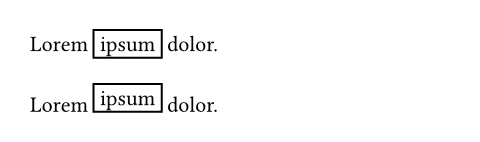
Typst now retains baseline information in more parts of the layout engine (most importantly for boxes, blocks, list items, and equations). This may lead to silent layout shifts. These are generally improvements, but if you’ve previously counter-acted bad-looking output through explicit adjustments, you may need to revisit those.
In particular, Typst will now set the baseline of a box to the baseline of its first line of content and use it to align the box with its surrounding text. This yields better-looking output out of the box.
// Typst 0.15+
Lorem #box(inset: 0.3em, stroke: 1pt)[ipsum] dolor.
// Typst 0.14 and below
Lorem #box(inset: 0.3em, stroke: 1pt)[ipsum] dolor.
File paths
If you are using Typst on Windows, you may have used backslashes in your file paths. This syntax is not supported anymore. Consistent use of forward slashes ensures your document compiles on all supported platforms.
// Typst 0.15+ ✅
#include "chapters/introduction.typ"

// Typst 0.14 and below ❌
#include "chapters\\introduction.typ"
Moreover, the Typst CLI does not support non-Unicode input paths anymore. Such paths are exceedingly rare today.
Math glyph stretching
In mathematical typesetting, glyphs frequently need to be stretched to the size of some part of an equation. This primarily applies to brackets, but also accents, arrows, and more. In Typst, this happens implicitly through matched delimiters or explicitly through the lr and stretch functions.
Typst 0.15 makes some adjustments to how ratios passed to these functions are resolved. Previously, a size of 200% passed to lr.size or stretch.size would be interpreted relative to a glyph size that was potentially already affected by display sizing. Now, ratios are always resolved relative to the base glyph size. In practice, this means that, to retain the same appearance, you may need to increase the target sizes you’ve configured for glyphs that are already larger out of the box in display style (e.g. integrals).
Math delimiters as functions
In Typst’s math mode, various symbols defined in General Symbols can be called like a function, either to be applied as an accent or to delimit body content. Typst 0.15 extends this handling to additional delimiters like chevron.l. This can change the output of existing calls, which would previously fall back to displaying the parentheses (which would rarely have produced desirable output in the case of delimiters).
// Typst 0.15+ ✅
$ chevron.l(x) $
// Typst 0.14 and below ⚠️
$ chevron.l(x) $

Math classes
The class function defines how part of an equation should be laid out (primarily the spacing around it). In Typst 0.14 and below, the class function applied recursively: If applied to a larger piece of content, all items in it would receive the class. In Typst 0.15, the class is only applied to the directly wrapped content. This is mostly a bug fix, but can lead to subtle layout changes.
Calligraphic letterforms in the default math font
With the update to New Computer Modern Math 8.1.0, the default calligraphic letterforms were changed. The previous letterforms can still be accessed by selecting stylistic set 6.
// Typst 0.15, default style.
$ R != cal(R) $
// Typst 0.15, with stylistic set 6.
// Reproduces the default style from Typst 0.14 and below.
#show math.equation: set text(stylistic-set: 6)
$ R != cal(R) $

Paragraphs, boxes, and blocks in HTML
Typst automatically collects inline-level content into paragraphs. In Typst 0.14 and below, the exact same rules were used to collect inline-level HTML elements (e.g. a <span>) into Typst paragraphs, which in turn result in <p> elements. This had the unfortunate effect that even use of the low-level typed HTML API could result in <p> elements appearing automatically. Consider the example below:
#html.div({
  html.span[Hello]
  html.div[World]
})
Where Typst 0.14 would insert an unexpected additional <p> element, Typst 0.15 yields the expected result:
<!-- Typst 0.14 and below ⚠️ -->
<div>
  <p><span>Hello</span></p>
  <div>World</div>
</div>

<!-- Typst 0.15+ ✅ -->
<div>
  <span>Hello</span>
  <div>World</div>
</div>
This change in output is achieved through a few new rules for how paragraphs are collected in HTML export. Previously, Typst would always categorize elements into either inline-level or block-level. It would then force inline-level elements into a paragraph whenever at least one block-level element was present in the same flow of content. In Typst 0.15, elements can instead be considered inline-level, block-level, or neutral:
- Text, Typst
boxelements and HTML phrasing content (elements that are allowed as children of<p>elements) are considered inline-level1 - All other HTML elements are considered neutral
- Typst
blockelements are considered block-level
Neutral elements don’t force adjacent inline-level content into paragraphs. They can co-exist with inline-level content in a mixed flow. This ensures that usage of the typed HTML API does not result in extraneous paragraphs.
Meanwhile, Typst elements that are block-level out of the box (e.g. heading) now explicitly use a block in their default show rule to ensure that they still force adjacent inline-level elements into paragraphs. This ensures consistency in paragraph grouping across paged and HTML export. Package authors should also explicitly use blocks when creating HTML components that Typst should consider block-level.
To make this change possible, the way boxes and blocks behave in HTML export has been adjusted: Instead of unconditionally wrapping their contents in a <span> or <div>, they now do just what is necessary to ensure their contents are considered inline- or block-level by browsers. If they contain multiple children, they still create a wrapper element, but for just a single child, they instead configure the CSS display property. And if the single child already has the appropriate display property by default, it is fully omitted. Then, the effect of the box or block is limited to influencing Typst’s paragraph grouping.
HTML script and style elements
The typed HTML functions for the HTML script and style element previously accepted arbitrary body content and then only failed during HTML serialization if the content resulted in non-textual elements. In Typst 0.15, they instead only accept strings in the first place. Note that you can also use them with raw syntax by accessing the .text field.
// Typst 0.15+ ✅
#html.style("a { color: red }")
#html.style(
  ```css
  a { color: red }
  ```.text
)

// Typst 0.14 ❌
#html.style[
  a { color: red }
]
Classes in SVG export
Typst 0.14 and below would generate the class attributes typst-frame, typst-doc, typst-group, typst-shape, and typst-text on SVG elements in SVG export. These are no longer emitted. If you are using the typst-frame class to style html.frame elements in HTML export, you’ll need to adapt your style sheet.
Variable font family names
Typst aims to unify different fonts from the same family under a single family name. To that effect, it automatically trims common style suffixes like “Bold” or “Condensed” from font family names. Instead of selecting these through the name, they should be accessed through Typst’s built-in mechanisms (such as the weight and stretch parameters).
In Typst 0.15, the additional suffixes “Variable”, “Var”, and “VF” are trimmed to unify static and variable fonts into a single family. If you’ve previously used a font with any of these suffixes in its family name, you should now omit the suffix when specifying the font.
Upcoming raw language tag changes
In the next Typst version, we will make a change to how raw language tags are parsed. Should this upcoming change have an effect on your document, the compiler will already warn you today and suggest how to adjust your document to future-proof it against the change.
Numbering fallback for the number zero
Not all numbering systems can express the number zero. In Typst 0.14 and below, those would silently fall back to Arabic numerals for 0. This behavior is deprecated in Typst 0.15. Using zero with these systems will become a hard error in the future.
Tightened validation in some functions
The array.slice function, str constructor, and text.features parameter now perform stricter validation on their inputs. If you’ve previously passed invalid or nonsensical input, you will now receive an error.
Renamed citation styles
Typst 0.15 renames some citation styles to stay aligned with upstream CSL changes. If you are relying on any of these, the compiler will warn you and suggest the new name.
Renamed symbols
Typst 0.15 also renames a few symbols in General Symbols. If you are using any of these, the compiler will warn you and suggest the new name.
Contributors
Thanks to everyone who contributed to this release!


- 1There are a few exceptions: Some elements like
<script>are considered phrasing content by the HTML specifications, but don’t make sense in paragraphs as they default todisplay: none.