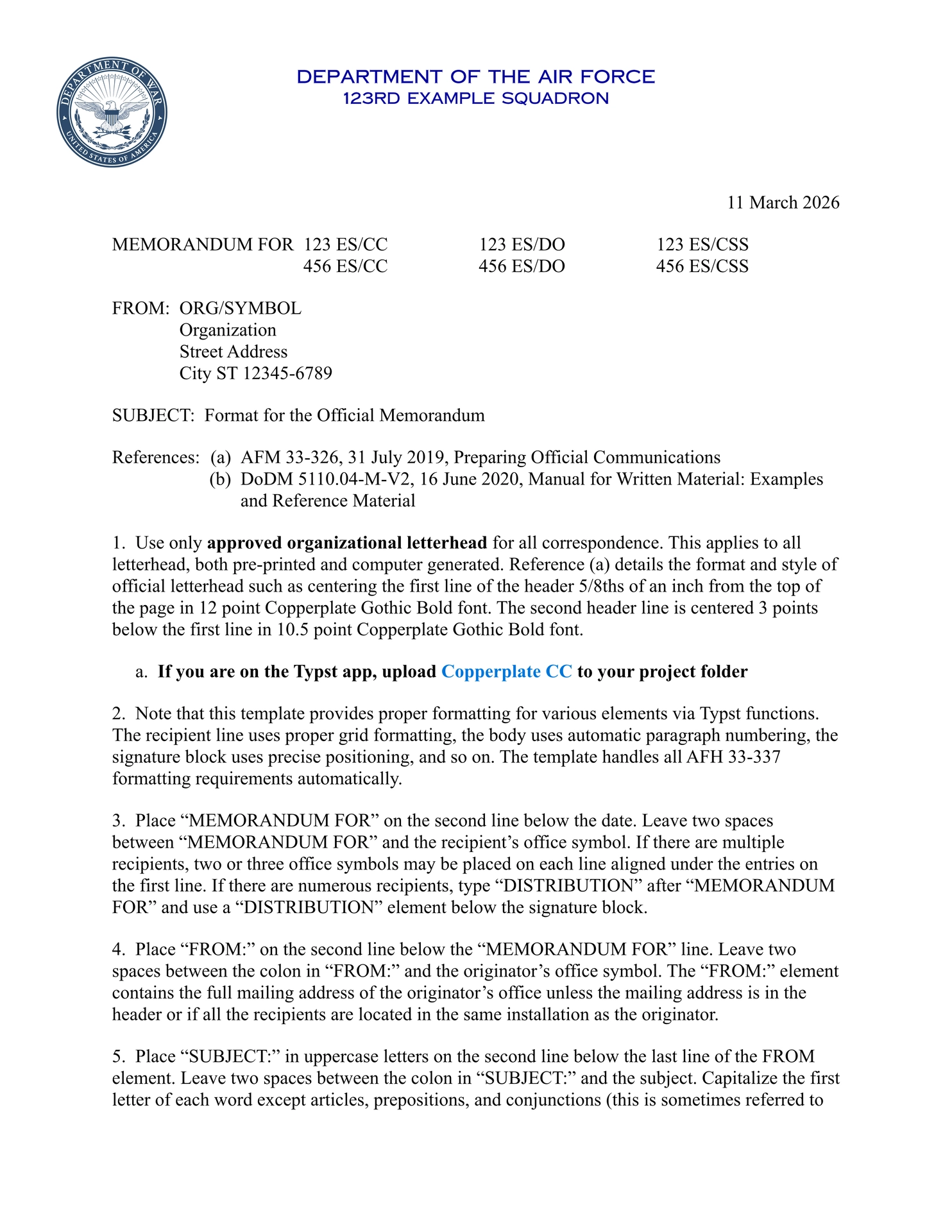



Less formatting. More lethality.
A comprehensive Typst template for creating official United States Air Force memorandums that comply with AFH 33-337 “The Tongue and Quill” formatting standards.
Maintained by TTQ.
Features
Core Formatting
- Full AFH 33-337 compliance with “The Tongue and Quill” formatting standards
- Automatic letterhead generation with configurable organization title, caption, and seal
- Pixel-perfect typesetting for all memorandum components in AFH 33-337
- Hierarchical paragraph numbering (1., a., (1), (a)) with proper indentation
- Comprehensive backmatter (Attachments, CC, Distribution) with smart formatting
- Page numbering starting from page 2 per AFH 33-337 standards
- Highly Configurable with numerous parameters for customization
- Comprehensive Indorsements with full support for action lines, multiple indorsement types, and long indorsement chains
- Classification markings with color-coded header/footer banners (UNCLASSIFIED, CONFIDENTIAL, SECRET, TOP SECRET)
- Custom footer taglines for service-specific branding (e.g., “semper supra” for Space Force)
- Inline tables with clean, formal formatting consistent with USAF correspondence standards
Quick Start
Typst.app (Easiest)
-
Go to the package page and click “Create project in app”.
-
Download the project fonts and upload them to your project folder. The template uses multiple open-source fonts — not just Copperplate. Recommended fonts from the
fonts/directory are:
CopperplateCC-Heavy.otf— letterhead / heading style (open-source Copperplate clone)NimbusRomNo9L-Reg.otf,NimbusRomNo9L-RegIta.otf,NimbusRomNo9L-Med.otf,NimbusRomNo9L-MedIta.otf— body / serif text (open-source Times clone)Cinzel-Regular.ttf— optional monospace font
You can either clone the repository to pull all fonts or download just the files you need. All font files are available from the fonts/ directory in the repo: https://github.com/nibsbin/tonguetoquill-usaf-memo/tree/main/fonts
- Note: Times New Roman is a proprietary Microsoft font that I can’t distribute legally. The package will automatically use the included NimbusRomNo9L files to approximate Times.
- Start with one of the template files:
template/usaf-template.typfor a standard Air Force memotemplate/ussf-template.typfor Space Forcetemplate/starkindustries.typfor a custom organization example
Local Installation
-
Initialize template from Typst Universe:
typst init @preview/tonguetoquill-usaf-memo:2.0.0 my-memo
cd my-memo
- Download the required fonts:
# Download the fonts used by the templates (example). Copy these into your project root or `fonts/` directory.
curl -L -o CopperplateCC-Heavy.otf https://github.com/nibsbin/tonguetoquill-usaf-memo/raw/main/fonts/CopperplateCC/CopperplateCC-Heavy.otf
curl -L -o Cinzel-Regular.ttf https://github.com/nibsbin/tonguetoquill-usaf-memo/raw/main/fonts/Cinzel/Cinzel-Regular.ttf
curl -L -o NimbusRomNo9L-Reg.otf https://github.com/nibsbin/tonguetoquill-usaf-memo/raw/main/fonts/NimbusRomanNo9L/NimbusRomNo9L-Reg.otf
curl -L -o NimbusRomNo9L-RegIta.otf https://github.com/nibsbin/tonguetoquill-usaf-memo/raw/main/fonts/NimbusRomanNo9L/NimbusRomNo9L-RegIta.otf
curl -L -o NimbusRomNo9L-Med.otf https://github.com/nibsbin/tonguetoquill-usaf-memo/raw/main/fonts/NimbusRomanNo9L/NimbusRomNo9L-Med.otf
curl -L -o NimbusRomNo9L-MedIta.otf https://github.com/nibsbin/tonguetoquill-usaf-memo/raw/main/fonts/NimbusRomanNo9L/NimbusRomNo9L-MedIta.otf
- Compile a template file (include
--font-pathif fonts are in afonts/subfolder):
# If your fonts are located in a local `fonts/` folder, specify it:
typst compile --font-path fonts --font-path . template/usaf-template.typ my-memo.pdf
Local Development
Clone the repo and follow these instructions to install the package locally for development.
git clone https://github.com/nibsbin/tonguetoquill-usaf-memo.git
cd tonguetoquill-usaf-memo
./build.sh  # Compile all template examples
Basic Usage
Import the core functions for creating memorandums:
#import "@preview/tonguetoquill-usaf-memo:2.0.0": frontmatter, mainmatter, backmatter, indorsement
Minimal Example:
#show: frontmatter.with(
  subject: "Your Subject Here",
  memo_for: ("OFFICE/SYMBOL",),
  memo_from: ("YOUR/SYMBOL",),
)

#show: mainmatter

Your memorandum content goes here.

- Use plus signs for numbered subparagraphs.
  - Indent with spaces for deeper nesting.

Continue with regular paragraphs.

#backmatter(
  signature_block: ("NAME, Rank, USAF", "Title"),
)
See the API Reference section below for complete parameter documentation.
Complete Examples
For comprehensive examples with all parameters, see:
- Standard Air Force memo:
template/usaf-template.typ- Shows proper formatting with references, attachments, cc, distribution, and indorsements - Space Force memo:
template/ussf-template.typ- Space Force memorandum variant with proper formatting - Custom organization memo:
template/starkindustries.typ- Demonstrates custom letterhead and extensive use of all optional parameters
Additional usage details
Paragraph numbering
AFH 33-337–compliant hierarchical numbering using Typst’s native enum lists.
Base paragraph numbered as 1., 2., etc.

- Level 1 subparagraph lettered as a., b., etc.
  - Level 2 subparagraph numbered as (1), (2), etc.
    - Level 3 subparagraph lettered as (a), (b), etc.

This returns to base paragraph numbering as 2.
Sentence spacing
The project includes GitHub Copilot prompts in .github/prompts/ to help with sentence spacing formatting:
- double-space-sentence.prompt.md: Converts single spaces after sentences to double spaces (
~) within memo content - single-space-sentence.prompt.md: Converts double spaces back to single spaces within memo content
These prompts help ensure consistent spacing formatting in your memorandums according to your organization’s preferred style.
Smart page break handling
The template automatically manages page breaks for closing sections according to AFH 33-337 standards:
- Attachments: “Do not divide attachment listings between two pages”
- Distribution: “Do not divide distribution lists between two pages”
- CC sections: Consistent handling with other sections
Inline tables
Tables can be placed directly in the memo body using standard Typst #table(...) syntax. The template automatically applies clean, formal formatting — 0.5pt black cell borders, standard padding, and bold column headers — consistent with the plain style of official USAF correspondence.
#table(
  columns: (1fr, 1fr, 1fr),
  table.header([Element], [Placement], [Reference]),
  [Date], [1.75 in from top, 1 in from right], [AFH 33-337 §Date],
  [Signature Block], [5th line below body text], [AFH 33-337 §Sig],
)
Tables do not count toward paragraph numbering and are rendered between numbered paragraphs as needed.
Classification markings
Set classification_level in frontmatter to display color-coded banners in the page header and footer:
#show: frontmatter.with(
  // ...
  classification_level: "SECRET",
)
Supported levels and their colors: "UNCLASSIFIED" (green), "CONFIDENTIAL" (blue), "SECRET" (red), "TOP SECRET" (orange). The banner text is rendered in bold at the top and bottom center of every page.
API Reference
The template uses a composable show rules architecture where you apply each section in order: frontmatter → mainmatter → backmatter → indorsements.
Core Functions
frontmatter(...)
Configures the memorandum header and establishes document-wide settings. Applied as a show rule.
Required Parameters:
subject: Memorandum subject line (must be descriptive and in title case)memo_for: Recipients (string or array of office symbols)memo_from: Sender information (string or array with office symbol, organization, address)
Key Parameters:
#show: frontmatter.with(
  letterhead_title: "DEPARTMENT OF THE AIR FORCE",           // Organization title
  letterhead_caption: "[YOUR SQUADRON/UNIT NAME]",           // Sub-organization
  letterhead_seal: none,                                     // Organization seal image
  date: none,                                                // Date (defaults to today; also accepts ISO string "YYYY-MM-DD")
  memo_for: ("[OFFICE1]", "[OFFICE2]"),                     // Recipients array
  memo_from: ("[YOUR/SYMBOL]", "[Organization]", "[Address]"), // Sender info array
  subject: "[Your Subject in Title Case - Required]",        // Subject line
  references: ("AFI 123-45", "AFMAN 67-89"),                // Optional references

  // Styling options
  letterhead_font: ("Copperplate CC",),                     // Letterhead fonts
  body_font: ("times new roman", "NimbusRomNo9L"),          // Body fonts
  font_size: 12pt,                                          // Font size (default 12pt; 10pt minimum per AFH 33-337 §5)
  memo_for_cols: 3,                                         // Recipient columns

  // Classification and branding
  classification_level: none,                               // "UNCLASSIFIED", "CONFIDENTIAL", "SECRET", or "TOP SECRET"
  footer_tag_line: none,                                    // Custom footer tagline (e.g., "semper supra")

  // Paragraph numbering
  auto_numbering: true,                                     // Automatic AFH 33-337 paragraph numbering (default true)
)
Responsibilities:
- Sets page layout with 1-inch margins
- Renders letterhead with optional seal
- Renders date, MEMORANDUM FOR, FROM, SUBJECT, and references sections
- Establishes typography and spacing rules
- Renders color-coded classification banners in header and footer when
classification_levelis set - Renders custom footer tagline when
footer_tag_lineis set - Stores configuration for downstream sections
mainmatter
Processes the memorandum body content with automatic paragraph numbering. Applied as a show rule with no parameters.
#show: mainmatter
Responsibilities:
- Applies AFH 33-337 hierarchical paragraph numbering (1., a., (1), (a))
- Handles proper indentation and spacing
- Auto-detects single vs. multiple paragraphs
- When
auto_numbering: falseis set infrontmatter, base-level paragraphs render flush left without numbering; only explicitly bulleted or numbered items (list/enum) receive numbering - Supports inline tables with formal black-border formatting
- Inherits configuration from frontmatter
backmatter(...)
Renders the closing section including signature block and optional attachments/cc/distribution. Called as a function (not a show rule).
Key Parameters:
#backmatter(
  signature_block: ("[NAME, Rank, USAF]", "[Title]"),      // Signature lines (required)
  signature_blank_lines: 4,                                // Blank lines above signature
  attachments: ("Attachment 1", "Attachment 2"),            // Optional attachments
  cc: ("[OFFICE/SYMBOL]",),                                // Courtesy copies
  distribution: ("[OFFICE]",),                             // Distribution list
  leading_pagebreak: false,                                // Force page break before backmatter
)
Responsibilities:
- Renders signature block with orphan prevention
- Renders attachments section with smart page breaks
- Renders cc section
- Renders distribution list
indorsement(...)
Creates an indorsement for forwarding or commenting on a memorandum. Called as a function with content body.
#indorsement(
  from: "ORG/SYMBOL",                                       // Sending organization
  to: "RECIPIENT/SYMBOL",                                   // Recipient organization
  signature_block: ("[NAME, Rank, USAF]", "[Title]"),      // Signature lines
  signature_blank_lines: 4,                                // Blank lines above signature
  attachments: none,                                        // Optional attachments
  cc: none,                                                 // Courtesy copies
  date: datetime.today(),                                  // Indorsement date (also accepts ISO string "YYYY-MM-DD")
  format: "standard",                                      // "standard", "informal", or "separate_page"
  action: none,                                            // none (default), "undecided", "approve", or "disapprove"
)[
  Your indorsement content here.
]
The action parameter:
none(default): No action line displayed"undecided": Displays “Approve / Disapprove” with neither option boxed or struck through"approve": Displays “Approve / Disapprove” with Approve boxed and Disapprove struck through"disapprove": Displays “Approve / Disapprove” with Disapprove boxed and Approve struck through
Responsibilities:
- Auto-numbers indorsements (1st Ind, 2d Ind, 3d Ind, etc.)
- Renders indorsement header with from/to
- Processes indorsement body content
- Renders signature block and backmatter sections
- References original memo metadata
Development
Contributing
Contributions are welcome! Please explore src/ for core functions and template/ for the user-facing examples. Feel free to open issues or submit pull requests.
Project Structure
├── src/                     # Core implementation
│   ├── lib.typ              # Public API exports
│   ├── config.typ           # Configuration constants
│   ├── frontmatter.typ      # Header section show rule
│   ├── mainmatter.typ       # Body content show rule
│   ├── backmatter.typ       # Closing section rendering
│   ├── indorsement.typ      # Indorsement rendering
│   ├── primitives.typ       # Reusable rendering functions
│   └── utils.typ            # Utility functions and helpers
├── template/                # Example templates
│   ├── usaf-template.typ    # Standard Air Force memo
│   ├── ussf-template.typ    # Space Force variant
│   ├── starkindustries.typ  # Custom organization example
│   └── assets/              # Fonts and images
├── prose/                   # Design documentation
│   ├── designs/             # Active design documents
│   ├── plans/               # Implementation plans
│   └── archive/             # Archived designs and analyses
├── pdfs/                    # Compiled example outputs
└── README.md                # This documentation
License
This project is licensed under the MIT License - see the LICENSE file for details.
External assets used in this project:
dow_seal.pngis public domainstarkindustries_seal.pngis public domain.Copperplate CCis under SIL Open Font License pulled from hereNimbusRomNo9Lis under GPL pulled from URW++ foundry