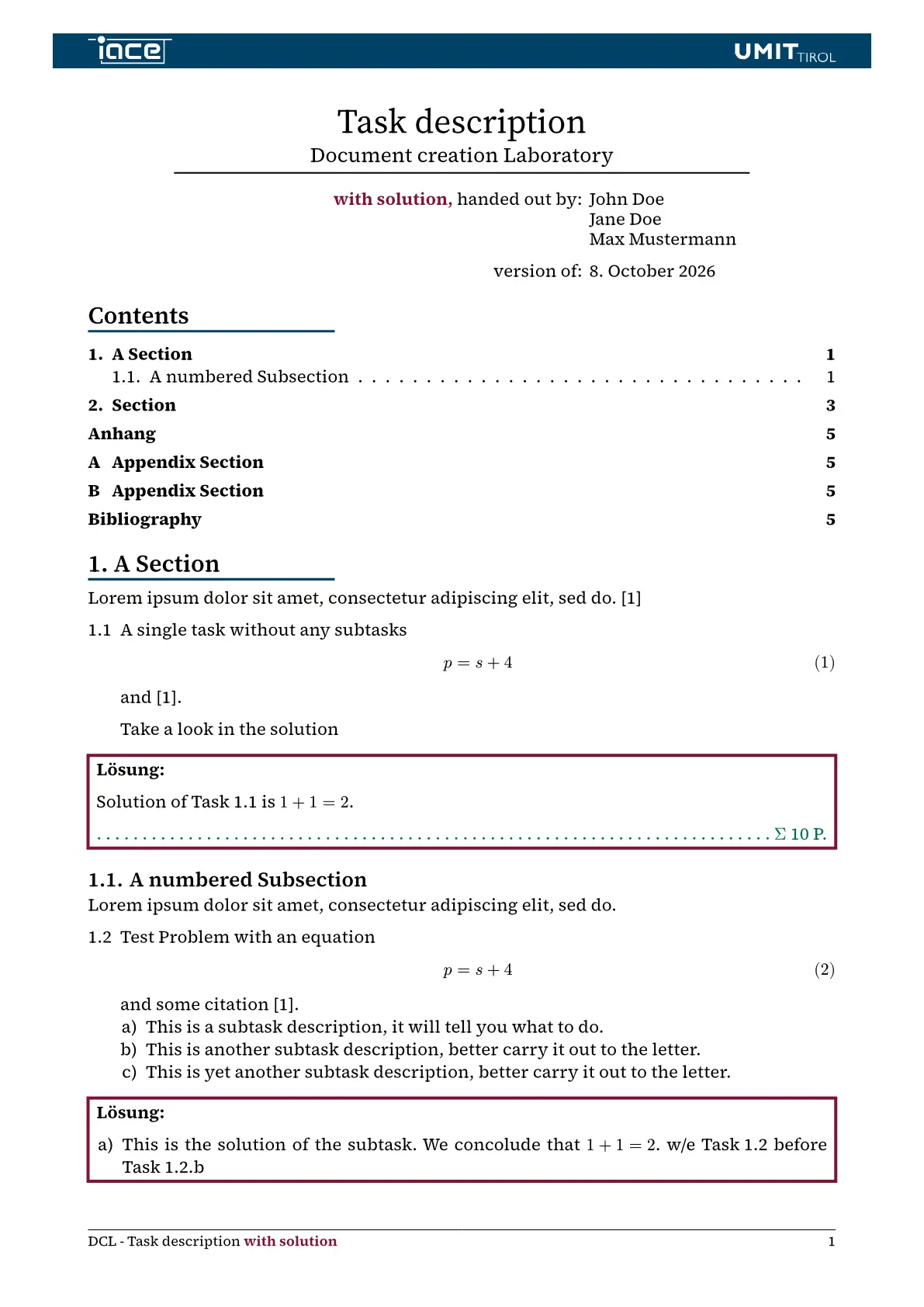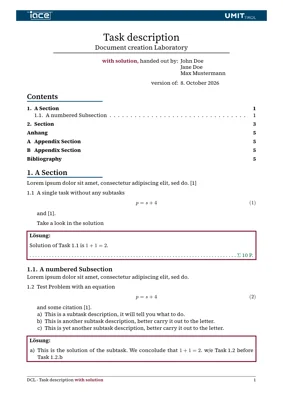
ratsch-bmim is a template for creating exams/practicals/… in Typst with the corporate design of UMIT TIROL.
Features
- Subset of predefined colors (see colors.typ).
- Variants:
- article
- exam
- exercise
- flyer
- lecture
- letter
- poster
- report
- slides
- thesis
- workbook
Example
See Artifact of last run for example variants:
- example/article.typ for the corresponding article Typst file.
- example/exam.typ for the corresponding exam Typst file,
- example/exercise.typ for the corresponding exercise Typst file.
- example/flyer-bio.typ for the corresponding flyer Typst file (A4, front and back page) with a short bio in the lower area of the back page.
- example/flyer-text.typ for a flyer with a second text in the lower area of the back page, in German.
- example/flyer-custom.typ for a flyer with own images: an image in place of the QR code and own logos bottom right.
- example/lab.typ for the corresponding report Typst file with self defined title block.
- example/lecture.typ for the corresponding lecture notes Typst file.
- example/letter.typ for the corresponding letter Typst file.
- example/poster.typ for the corresponding poster Typst file.
- example/report.typ for the corresponding report Typst file.
- example/slides-longTitle.typ for the corresponding slide Typst file using different logos, activate progress animation with a huge number of authors and a long title, see Github Pages for an example output.
- example/slides-customSlides.typ for the slides of slides-longTitle with own title, outline and section slides (options
title-slide,outline-slide,section-slide). - example/slides-notes.typ for the slides of slides-longTitle with the speaker notes right of each slide (option
notes). - example/slides-handout.typ for the slides of slides-longTitle as handout, animations show their final state (option
handout). - example/slides-shortTitle.typ for the corresponding slide Typst file.
- example/slides-article.typ for the slides of slides-longTitle rendered as an article (article mode); both share the slides in example/content/slides.typ.
- example/thesis.typ for the corresponding thesis Typst file.
- example/workbook.typ for the corresponding workbook Typst file.
Usage
Create a new typst project based on this template locally.
% typst init @preview/ratsch-bmim
% cd ratsch-bmim
Or create a project on the typst web app based on this template.
Compile (and watch) example
% typst w ./example/<variant>.typ --root .
Compile (and watch) your typst file
% typst w main.typ
This will watch your file and recompile it to a pdf when the file is saved.
Install locally
- Store the package in
~/.local/share/typst/packages/local/ratsch-bmim/0.5.0 - Import from it with
#import "@local/ratsch-bmim:0.5.0": *
Options
Global options
These options can be passed to every variant:
| Option | Default | Description |
|---|---|---|
lang |
"de" |
Language of all generated texts: "de" or "en" |
theme |
"cd26" |
Color theme by name ("cd26", "cd20") or single colors, see Themes |
font |
auto |
Main text font; auto uses fonts.serif (slides: fonts.sans) |
fonts |
see Fonts | Fonts per role, single roles can be replaced |
size |
11pt |
Font size (poster: 20pt, slides: 18pt) |
logo |
auto |
auto, none, content, or a dictionary with left, right, title-left, title-right (slides), flyer-left, flyer-right (flyer) |
institute |
"iace" |
Institute, whose logo and name are shown (header, title slide, title page of lecture and workbook, …): "iace" (Institut für Automatisierungs- und Regelungstechnik), "ims" (Institut für Mess- und Sensortechnik), or an own one as (name: [..], logo: image(..)), see Institutes |
titleblock |
auto |
auto (title block of the variant), none, or a function args => content |
show-solution |
none |
none, "inline" or "bottom" (exam, exercise, report, workbook) |
task-show-points |
false |
Show the points of each task (exercise, workbook) |
oneside |
depends | One-sided layout: chapters start on the next instead of the next odd page |
A user-defined titleblock gets a dictionary with the arguments of the
variant plus lang, spell (the translations) and show-solution, see
example/lab.typ.
Variants
title and course can be given as [Text] or ([Long], [Short]): the long
form is used in the title block, the short form in headers and footers. authors is required for all variants
except flyer, letter and slides.
| Variant | Parameters |
|---|---|
article |
title, subtitle, course, authors, date |
exam |
course, title, authors, date, total-time (required), show-solution, empty-sheets (auto = one per task, none, int), show-hints (true), oneside (false) |
exercise |
course, title, authors, date, show-solution, task-show-points |
flyer |
title (required), series (above the title), details (rows below the title with free labels: (([Presenter], [...]), ([Date], [...])), none or [] as label gives a row without label and colon), background (image of the front page), qr-code (any content bottom left of the front page, e.g. a QR code or an image, its size is set by the user, e.g. width: 70pt), back-image (image at the top of the back page), size (9.5pt, body text of the back page), sizes (font sizes, single ones can be given: series 11pt, title 25pt, details 16pt, badge 11pt, heading 20pt); the document body is the back page, designed freely with flyer-heading and flyer-badge (see Helpers), a second logo next to the UMIT logo is set with logo: (flyer-left: ..), flyer-right replaces the UMIT logo |
lecture |
course, authors, date, oneside (false) |
letter |
subject, date, location, recipient (name, address, pro, institution), sender (name, pos, institute, department, tel, fax, email, signature) |
poster |
title, authors, page ("a2"), orientation ("landscape", "portrait"), date, event, location, contact |
report |
title, course, authors, date, show-solution |
slides |
title, subtitle, conference, institution, location, authors, authors-short, date, bib-as-footnote (true), aspect-ratio ("16-9", "16-10", "4-3"), font, align, progress-animation ((slides: bool, section: bool)), size, handout, article-mode (false, render as document, see below), article-variant ("report", "article", "lecture" or a function, see below), notes, margins, title-slide, outline-slide, section-slide (auto, none or a touying slide function, see below) |
thesis |
program ("Master", "Bachelor"), university ("LFUI", "UMIT"), title, subtitle, author (required), date, advisor (array of (name, university, department, unit)), abstract ((english, german)), thanks, oneside (false) |
workbook |
course, authors, date, show-solution, task-show-points, oneside (false) |
date is a datetime (default: today) or content.
Tasks
task is available in exam, exercise, report and workbook:
// single task
#task(points: 5, name: [Optional name], label: <task:a>,
  description: [...], solution: [...])
// task with subtasks: problem description, then one dictionary per subtask
#task(label: <task:b>, [Problem description],
  (points: 2, label: <task:b1>, description: [...], solution: [...]),
  (points: 3, description: [...], solution: [...]),
)
Missing or misspelled arguments are reported with an error message.
Own title, outline and section slides
The options title-slide, outline-slide and section-slide of
slides(...) are handled the same way: auto uses the slide of the template,
none shows no slide, a slide function (built with touying-slide-wrapper)
replaces it. The title and outline slide are shown where #title-slide() and
#outline-slide(..) are called and get their arguments (outline-slide:
cover-lvl and e.g. title), the section slide at each first level heading.
The information of the slides is in self.info (title is [Title] or
([Long], [Short])), the options of the template in self.info.extra.opts
(e.g. lang, theme, fonts, logo), the colors in self.colors; in article mode the title
and outline slide are skipped:
#show: bmim.slides(
  // ...
  title-slide: (..args) => touying-slide-wrapper(self => {
    self = utils.merge-dicts(self,
      config-page(margin: 0pt, header: none, footer: none),
      config-common(freeze-slide-counter: true))
    touying-slide(self: self, block(width: 100%, height: 100%,
      fill: self.colors.primary, inset: 2em,
      text(fill: white, size: 28pt, (self.info.title,).flatten().first())))
  }),
)
See example/slides-customSlides.typ.
Slides as article
touying’s article mode renders the same source as a document instead of slides,
by default in the layout of the report variant: title, subtitle (in place of the
course), authors and date of the slides form its title block, title-slide and outline-slide are
skipped and animations show their final state. Enable it with
article-mode: true or when compiling:
% typst compile slides.typ --input export-mode=article
touying’s markers select content per output, e.g. #article-text[..] (prose
that replaces the whole content of its slide), #article-only[..] and
#slides-only[..], see
example/slides-article.typ.
The option article-variant selects the variant of the document: "report"
(default), "article" (title and subtitle), "lecture" (the title of the
slides as course) or a function, which gets the information of the slides
(title, subtitle, authors, date, institution, conference,
location) and returns a variant. The global option titleblock gives an own
title block of that variant:
#show: bmim.slides(
  // ...
  article-mode: true,
  article-variant: info => bmim.workbook(course: info.title, authors: info.authors),
  titleblock: args => [...],
)
Helpers
| Function | Description |
|---|---|
#show: mainmatter |
Starts the main part: page numbering restarts at 1, chapters start on a new (two-sided: odd) page |
#show: backmatter |
Starts the appendix: chapters are numbered A, B, …; to: "odd" sets the page break (two-sided) |
abstract[...] |
Abstract block for the article |
enum-label("name") |
Inside an enum item: makes the item referable with @name |
wrapped-enum-numbering("A") |
Enum numbering that works with enum-label, e.g. #set enum(numbering: wrapped-enum-numbering("A")) |
poster-box([Heading], [Content], height: none) |
Colored box with heading for posters |
title-slide() |
Title slide of the slides, uses the information of slides(...), or the option title-slide if given |
outline-slide(title: [...], cover-lvl: 1) |
Slide with the outline, the section cover-lvl is highlighted, or the option outline-slide if given |
translated-month(date, lang) |
Name of the month of date in the language lang |
umit-logo(color: "white", subtitle: true, ..args) |
Logo of UMIT TIROL in the language of the document, color "white" or "blue", subtitle: false without “Die Tiroler Privatuniversität”; args (e.g. height: 30pt) are passed to image, e.g. logo: (flyer-right: umit-logo(height: 40pt)) |
institute-logo(institute: auto, ..args) |
White logo of an institute, institute is a key of institutes ("iace", "ims", …), auto the one of the option institute; args (e.g. height: 30pt) are passed to image |
flyer-heading(body, size: auto, rule: 100%) |
Heading with a line below on the back page of the flyer; size (auto: heading of the option sizes of the flyer) is the font size, rule the length of the line |
flyer-badge(body, end: none) |
Rotated badge on the back page of the flyer, right aligned up to the page edge, where it is placed; a datetime is shown with date and time, an optional end gives a time span, e.g. “5th November 2026, 17:00–18:30” |
context print-date-time(date, end: none) |
Date with the time of a datetime in the language of the document, e.g. “5th November 2026, 17:00” or “5. November 2026, 17.00 Uhr” (as in the badge of the flyer); with end a time span, “5th November 2026, 17:00–18:30” on the same day, otherwise “start – end” |
build-vcard((firstname: .., lastname: .., ..)) |
Contact as vCard 3.0, e.g. as data of a QR code; optional keys title, role, organization, address (street, zip, town, country), telephone, email, url, one of firstname and lastname is required |
build-vcalendar((name: .., start: .., ..)) |
Event as iCalendar (RFC 5545), e.g. as data of a QR code; start and optional end are datetimes (without time an all-day event), optional location, description, uid |
Themes
The colors follow the corporate design of UMIT TIROL. Two themes are
predefined in color-theme (see colors.typ): cd26
(default, CD 2026) and cd20 (CD 2020). Select one by name, or replace single
colors (primary, secondary, highlight, background, neutral-lightest):
#show: bmim.report(
  // ...
  theme: "cd20",
)
#show: bmim.report(
  // ...
  theme: (primary: rgb("#008000")),
)
Institutes
The institutes are defined in institutes in data.typ: the
name per language, the white logo in the assets folder and optionally a
scale of the logo, if it appears larger or smaller than the others at the
same height, and a vertical shift dy relative to its height (positive:
down). scale and dy are a single value for all places of the logo or a
dictionary per place (header, slides-header, title-slide, title-page)
with rest for the others, e.g. dy: (slides-header: 20%, rest: 0%). A
further institute only needs a further entry there, its key is then a value
of the option institute:
#show: bmim.report(
  // ...
  institute: "ims",
)
The logos of the package can be placed anywhere with umit-logo and
institute-logo (see Helpers); a path into the package does not work in
documents that import it.
An institute that is not defined there can be given directly; its logo is shown as given:
#show: bmim.report(
  // ...
  institute: (name: [Own institute], logo: image("logo.svg", height: 20pt)),
)
Fonts
Several fonts are used, each for a role of the fonts option:
serif: Source Serif 4 for body textsans: Source Sans 3 for text in slides and the abstractmono: Source Code Pro for codeletter: Bitstream Vera Sans for text in letterlogo: Nimbus Sans for the text next to the LFUI logo (thesis)
To install these under arch linux:
% yay -S adobe-source-sans-fonts adobe-source-serif-fonts adobe-source-code-pro-fonts ttf-bitstream-vera gsfonts
Single fonts can be replaced, the others keep their defaults:
#show: bmim.report(
  // ...
  fonts: (mono: "Fira Code"),
)
The option font sets the main text font directly; by default (auto) it is
fonts.serif, for slides fonts.sans.
Tests
scripts/run_tests.sh runs the regression tests: every tests/*.typ is
compiled and checked against its header lines // expect-error: <text>
(must fail with this error) or // expect-text: <text> (must compile and
contain this text). Files without expect-error must compile without
warnings. pdftotext (poppler) is required.
License
The images
- logo_iace_*
- logo_ims_*
- logo_umit_*
- background_*
- footer_umit_*
in the assets folder are the property of the UMIT TIROL.
The images
- logo_lfui_*
in the assets folder are the property of the University of Innsbruck.
The rest of the project is licensed under the MIT License.