Universe

Create project in app

Modern Invoice Template for Typst

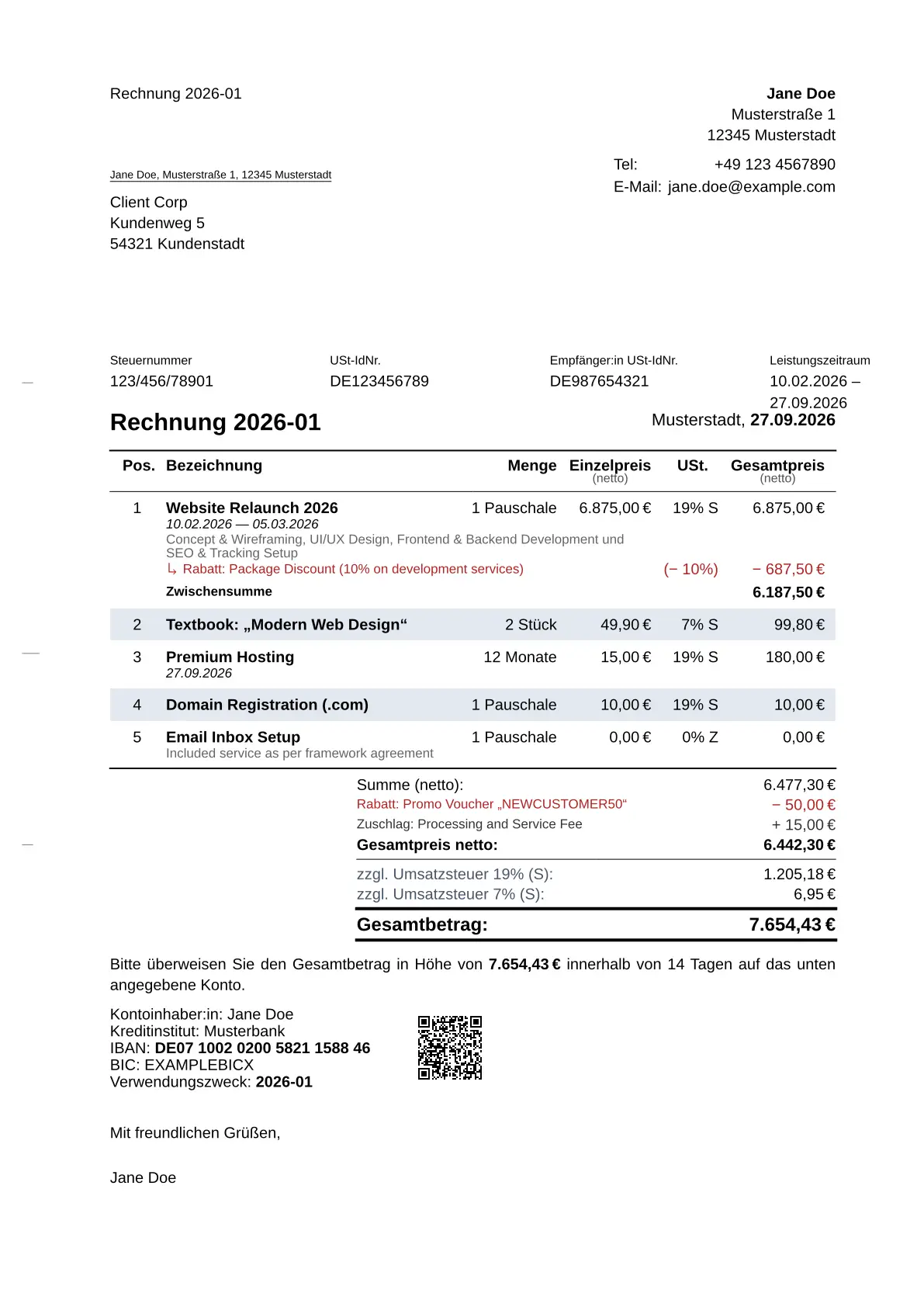
A professional, compliant, and automated invoice template for Typst. This package follows the German DIN 5008 standard (Form A & B) and automates calculations, VAT handling, and payment details.

Example Invoice

Features

  • DIN 5008 Compliant: Supports both Form A and Form B layouts via the new Theming API.
  • Block-based API (v0.2.0): Clean, scoped, and declarative structure using #line-items, #item, and #bundle—inspired by CeTZ.
  • Automatic Calculations: Handles line items, sub-totals, and VAT (MwSt) automatically.
  • EPC QR-Code (GiroCode): Generates a scannable banking QR code for easy payment apps using rustycure.
  • Advanced Item Modifiers: Apply specific discounts, surcharges, and tax rates at the item, bundle, or global level.
  • Customizable: Easy configuration of sender, recipient, payment goals, and bank details.

Getting Started

Installation

Import the package at the top of your Typst file:

#import "@preview/invoice-pro:0.2.0": *

Basic Usage

Here is an example of how to create an invoice using the new v0.2.0 API:

#import "@preview/invoice-pro:0.2.0": *

#show: invoice.with(
  theme: themes.DIN-5008(form: "A"), // or form: "B"
  sender: (
    name: "Deine Firma / Name",
    address: "Musterstraße 1",
    city: "12345 Musterstadt",
  ),
  recipient: (
    name: "Kunden Name",
    address: "Kundenstraße 5",
    city: "98765 Kundenstadt",
  ),
  invoice-nr: "2026-01",
  tax-nr: "123/456/789",
)

// Add Invoice Items inside a scoped block
#line-items[
  #item(
    [Beratung & Konzeption],
    price: 85.00,
    quantity: 5,
    unit: "Std."
  )

  #item(
    [Webdesign Layout (Pauschale)],
    price: 1200.00,
  )

  #item(
    [Stock-Lizenzen (Bildmaterial)],
    price: 25.00,
    quantity: 4,
  )

  #discount([Projekt-Rabatt (Stammkunde)], amount: 10%)
]

// Payment Terms
#payment-goal(days: 14)

// Bank Details with QR Code
#bank-details(
  bank: "Musterbank",
  iban: "DE07100202005821158846",
  bic: "MUSTERBIC",
)

#signature()

Configuration

invoice arguments

Argument Type Description
theme function The visual theme to apply to the invoice (e.g., themes.DIN-5008()).
locale function The locale settings for language and number formatting (e.g., locale.de).
sender dictionary A dictionary containing sender details (e.g., name, address).
recipient dictionary A dictionary containing recipient details (e.g., name, address).
date datetime The date of the invoice. Defaults to today.
subject string | content The subject line of the invoice. Defaults to "Rechnung".
references none | dictionary | array Reference information for the document header (e.g., customer number).
invoice-nr none | string | content The unique identifier or number of the invoice.
tax-nr none | string | content Your unique tax identifier.
tax auto | ratio | dictionary | none The default tax rate to apply if not specified elsewhere. If auto, it is inferred from the locale.
tax-mode string Determines if prices are handled as "inclusive" or "exclusive" of tax.
tax-exempt-small-biz bool If true, applies small business tax exemption logic according to the locale.
body content The content of the invoice, typically containing line-items and other components.

Theming

You can customize the underlying layout using the new theming engine:

#show: invoice.with(
  theme: themes.DIN-5008(
    form: "A", // "A" or "B"
    font: "Liberation Sans",
    hole-mark: true,
    folding-marks: true
  ),
  // ...
)

line-items function

The line-items block establishes tax settings, global modifiers, and wraps your items.

Argument Type Description
input-gross bool | auto Defines whether the input prices within this container are treated as gross (inclusive of tax) by default. If auto, infers from tax-mode.
tax ratio | dictionary | auto The default tax rate or tax dictionary applied to the items within this container. Defaults to 0% if not provided.
tax-mode "exclusive" | "inclusive" | auto Determines how taxes are calculated globally. Defaults to "exclusive" (Net).
show-column dictionary | auto Dictionary to override automatic table layout visibility. See possible inputs below.
show-total bool | auto Controls whether to display the summary/totals block below the line items table. Defaults to true.
show-information bool | auto Whether to show information notices about details that apply to all items (e.g., if all items share the same delivery date). Defaults to true.
body content The content block containing nested #item, #bundle, #discount, and #surcharge elements.

show-column inputs

You can selectively toggle specific columns or elements within the line items table by passing a dictionary to the show-column argument. For example: #line-items(show-column: (pos: false, tax-rate: false))[...]

Key Type Description
pos bool | auto Visibility of the position/index column (e.g., 1, 2, 3).
description bool | auto Visibility of the description text under the item name.
modifier bool | auto Visibility of individual modifier rows (discounts/surcharges) applied to items.
date bool | auto Visibility of the date text below the item name.
quantity bool | auto Visibility of the quantity column.
unit bool | auto Visibility of the unit text (e.g., “Std.”, “Stk.”) next to the quantity.
unit-price bool | auto Visibility of the individual unit price column.
total-price bool | auto Visibility of the calculated total price column for the item.
tax-rate bool | auto Visibility of the tax rate column.

item function

Represents a single line item, product, or service on the invoice. It automatically calculates base prices, totals, and applies relevant taxes and modifiers.

Argument Type Description
name string | content The name or title of the item.
description string | content | auto | none Additional details or description about the item.
quantity int | float | decimal | string | auto The amount being billed. Automatically defaults to 1.
base-quantity int | float | decimal | string | auto The reference quantity for the price, useful for calculating price-per-unit ratios. Automatically defaults to 1.
unit string | content | auto | none The unit of measurement (e.g., "Std.", "Stk.").
date datetime | array | auto | none The date or a date range (start, end) the item or service was provided.
price int | float | decimal | string | auto The price per unit. Note: You must specify either price or total, but not both.
total int | float | decimal | string | auto The total price for the item. Note: You must specify either price or total, but not both.
input-gross bool | auto Indicates if the provided price/total already includes tax.
tax ratio | dictionary | auto The specific tax rate or tax dictionary for this item. Defaults to a zero tax rate.
item-id string | dictionary | auto | none An identifier for the item, such as an EAN/GTIN/ISBN string, or a dictionary with seller, buyer, and standard keys.
reference string | auto | none An optional reference string for the item.
modifier array | content | auto | none Specific modifiers (like #discount or #surcharge) applied specifically to this item.

bundle function

A container used to group multiple items together under a single overarching item. It aggregates the totals and dates of its bundled children and acts as a virtual item within the invoice.

Argument Type Description
name string | content The name or title of the bundle.
description string | content | auto | none Additional details about the bundle. If set to auto, it automatically generates a description by joining the names of its bundled items.
quantity int | float | decimal | string | auto The quantity of the entire bundle. Automatically defaults to 1.
base-quantity int | float | decimal | string | auto The reference quantity for the bundle’s price calculation. Automatically defaults to 1.
unit string | content | auto | none The unit of measurement for the bundle.
date datetime | array | auto | none The date or date range for the bundle. If auto, it calculates a single date or date range based on the dates of the bundled items.
input-gross bool | auto Passed through the context to indicate if the bundle’s internal calculations should be treated as gross (inclusive of tax).
tax ratio | dictionary | auto Passed through the context to set a default tax rate for the bundle’s items. Defaults to a zero tax rate.
item-id string | dictionary | auto | none An identifier for the bundle, such as an EAN/GTIN/ISBN string, or a dictionary with seller, buyer, and standard keys.
reference string | auto | none An optional reference string for the bundle.
body content The content block containing the individual items or nested bundles that make up this bundle.
#line-items[
  #bundle(
    [Software Development Project],
    description: [Full-stack development for the mobile app],
    date: (date(1, 3, 2026), date(31, 3, 2026)),
    unit: "Phase",
  )[
    #item([Backend Development], quantity: 40, unit: "hrs", price: 110.00)
    #item([Frontend Implementation], quantity: 60, unit: "hrs", price: 95.00)
    #item([Project Management], quantity: 1, unit: "flat", price: 500.00)
  ]
]

Example Bundle

modifier function

Represents a generic modifier applied to an item, a bundle, or the entire invoice. It can handle both relative (percentage) and absolute (currency) modifications.

Argument Type Description
name string | content The name or label of the modifier (e.g., “Summer Sale Discount”, “Shipping Fee”).
description string | content | auto | none An optional description providing more details about the modifier.
amount ratio | int | float | decimal | string | auto The value of the modifier. Ratios (e.g., -10%) apply relative changes. Numeric values act as absolute monetary changes. Negative values are discounts; positive values are surcharges.
input-gross bool | auto Indicates whether the modifier’s absolute amount should be treated as a gross value (inclusive of tax). Automatically defaults to false.
#line-items(input-gross: true)[
  #item([Workstation Pro Laptop], quantity: 2, price: 2499.00)
  #item([Technical Setup], total: 150.00)

  // Absolute surcharge
  #surcharge([Express Shipping], amount: 25.00)

  // Relative discount
  #discount([Educational Discount (5%)], amount: 5%)
]

Example Modifiers


discount / surcharge function

Helper functions to apply modifiers safely. They enforce positive input values and handle the underlying signs automatically.

Argument Type Description
name string | content The name or label of the discount or surcharge.
description string | content | auto | none An optional description providing more details.
amount ratio | int | float | decimal | string The value. Must be a positive number or ratio. Defaults to 0.
input-gross bool | auto Indicates whether an absolute amount is treated as gross (inclusive of tax). Automatically defaults to false.
#discount([Summer Sale], amount: 15%)
#surcharge([Express Delivery], amount: 20.00)

apply function

#line-items[
  #item([UI Design Workshop], quantity: 1, price: 800.00)

  // Scoped tax application for multiple items
  #apply(tax: tax.lower-rate(7%))[
    #item(["Mastering Typst" - Hardcover], quantity: 3, price: 45.00)
    #item(["Design Systems" - eBook], quantity: 1, price: 29.99)
  ]

  // Single item tax override (e.g., tax-exempt service)
  #item(
    [International Consulting],
    price: 150.00,
    quantity: 5,
    tax: tax.outside-scope()
  )
]

Example Apply

payment-goal function

Argument Type Description
days int | none The number of days until payment is due.
date datetime | content | none A date until payment is due.
#payment-goal()

Bitte überweisen Sie den Gesamtbetrag von 123,45€ zeitnah ohne Abzug auf das unten genannte Konto.

#payment-goal(days: 14)

Bitte überweisen Sie den Gesamtbetrag von 123,45€ innerhalb von 14 Tagen ohne Abzug auf das unten genannte Konto.

#payment-goal(date: datetime(day: 1, month: 1, year: 2026))

Bitte überweisen Sie den Gesamtbetrag von 123,45€ bis spätestens 01.01.2026 ohne Abzug auf das unten genannte Konto.

bank-details function

Defines and renders the bank account information for payments, including an optional EPC-QR code for mobile payment apps.

Argument Type Description
name string | auto | none The name of the account holder. If auto, it defaults to the sender’s name.
bank string | none The name of the banking institution.
iban string | none The International Bank Account Number (IBAN).
bic string | none The Bank Identifier Code (BIC/SWIFT).
reference string | auto | none The payment reference to be used by the customer.
payment-amount decimal | float | int | auto | none The specific amount to be paid. If auto, it uses the calculated document total.
show-reference bool Whether to display the reference field in the output. Defaults to true.
account-holder-text auto Optional custom text to label the account holder field.
qr-code dictionary Configuration for a payment QR code (e.g., EPC-QR). Can include display (bool) and size (length).
// Standard usage with automatic total and reference
#bank-details(
  bank: "Sparkasse Musterstadt",
  iban: "DE00 1234 5678 9012 3456 78",
  bic: "SPKDE...",
)

API Stability

With the major refactoring introduced in version 0.2.0, the package structure is solidifying. Here is the current stability status of the various API components:

  • Invoice Header (invoice arguments): Mostly Stable. The core invoice configuration is established. Future updates to the header will be non-breaking and will primarily consist of adding new optional fields.
  • Data Model (#line-items, #bundle, #item): Stable. The new block-based data model is considered almost finished and safe to use.
    • Exception: The unit argument in #item and #bundle will change in a future release to strictly comply with the standardized unit formats and codes required for upcoming ZUGFeRD e-invoicing support.
  • Theming (theme): Under Construction. The theming engine is still evolving and will most likely experience breaking changes in the next updates as we refine customization capabilities.
  • Localization (locale): Under Construction. The localization and internationalization systems are actively being worked on and are subject to change.

Dependencies

This template relies on these amazing packages:

  • letter-pro for the DIN layout.
  • sepay for EPC-QR-Code generation.
  • ibanator for IBAN formatting.
  • loom for reactive document rendering.

Acknowledgements:

  • Special thanks to classy-german-invoice by Kerstin Humm, which served as inspiration and provided the logic for the EPC-QR-Code implementation.

License

MIT