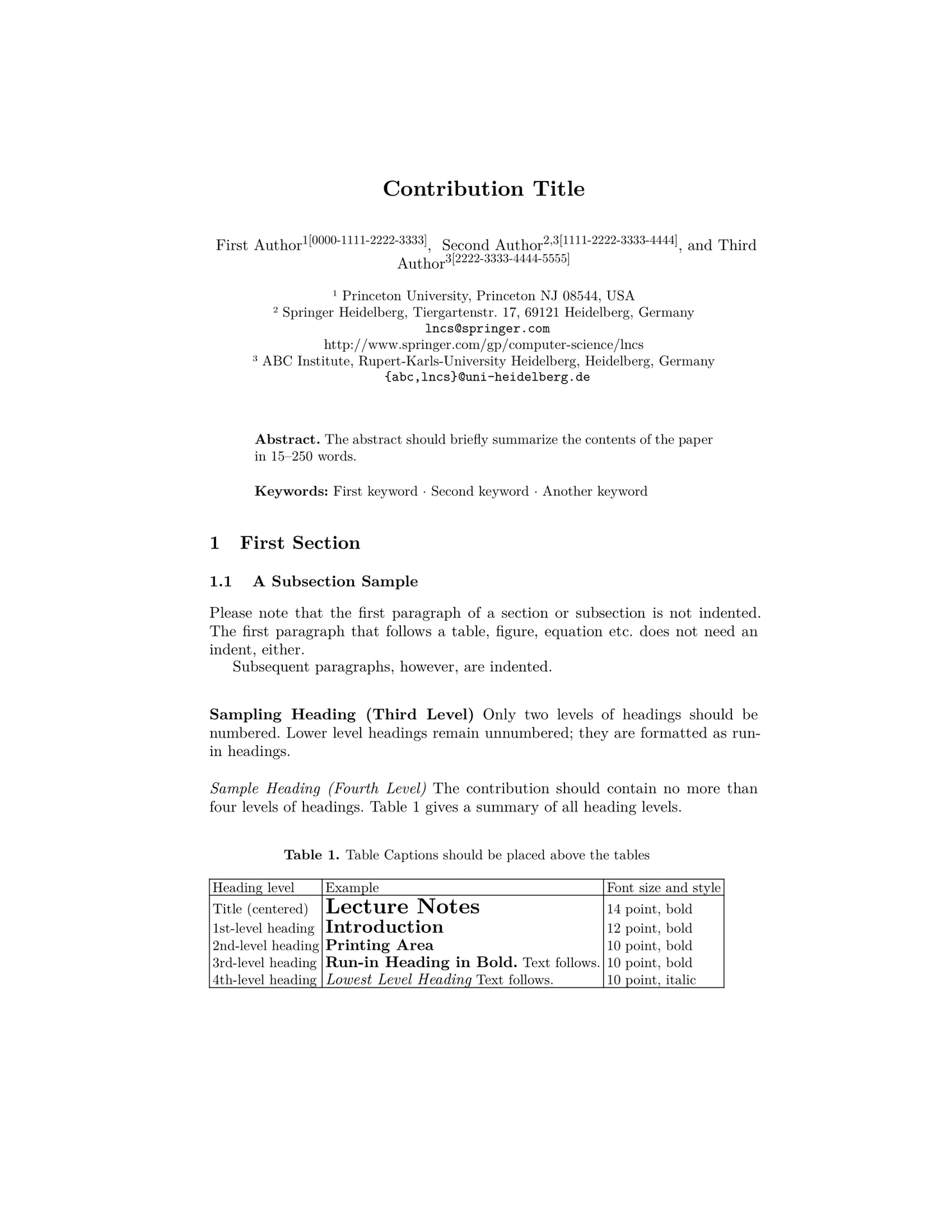
fine-lncs is a Typst template that tries to closely replicate the look and structure of the official Springer LNCS (Lecture Notes in Computer Science) LaTeX template.
Usage
#import "@preview/fine-lncs:0.6.5": author, institute, lncs, proof, theorem

#let inst_princ = institute(
  "Princeton University",
  addr: "Princeton NJ 08544, USA",
)
#let inst_springer = institute(
  "Springer Heidelberg",
  addr: "Tiergartenstr. 17, 69121 Heidelberg, Germany",
  email: "lncs@springer.com",
  url: "http://www.springer.com/gp/computer-science/lncs",
)
#let inst_abc = institute(
  "ABC Institute",
  addr: "Rupert-Karls-University Heidelberg, Heidelberg, Germany",
  email: "{abc,lncs}@uni-heidelberg.de",
)

#show: lncs.with(
  title: "Contribution Title",
  // Opt.: Set this, if the title is too long to avoid linebreaks in the header of odd pages
  // running-title: "Short version of contribution title",
  // running-author: "Override the default author shortening",
  thanks: "Supported by organization x.",
  authors: (
    author("First Author", insts: (inst_princ), oicd: "0000-1111-2222-3333"),
    author(
      "Second Author",
      insts: (inst_springer, inst_abc),
      oicd: "1111-2222-3333-4444",
    ),
    author("Third Author", insts: (inst_abc), oicd: "2222-3333-4444-5555"),
  ),
  abstract: [
    The abstract should briefly summarize the contents of the paper in
    15--250 words.
  ],
  keywords: ("First keyword", "Second keyword", "Another keyword"),
  bibliography: bibliography("../../template/refs.bib"),
)

= First Section

My awesome paper ...
Local Usage
If you want to use this template locally, clone it and install it with:
just install
This allows you to import the template using
#import "@local/fine-lncs:0.6.5": lncs, institute, author, theorem, proof
Development
Common tasks are wrapped in a justfile. Run just in the repo root to see all recipes:
dev              # Symlink this template into the local @preview package dir
install          # Install this template locally as @local/fine-lncs
fmt              # Format all .typ files in place
fmt-check        # Check formatting without modifying files (same as CI)
gen-tests        # Regenerate tests/template/ and tests/readme/ from source
gen-tests-check  # Regenerate, then fail if the committed copies drift (CI)
pdf-to-ref       # Convert a LaTeX PDF into ref/1.png, ref/2.png, ...
test             # Run the test suite
bump <version>   # Bump the package version across all files
ci               # Run everything CI runs
Required tools:
just— command runnerutpm— local package management and Universe publicationtypstyle— formatter (cargo install typstyle)tytanic— test runner (cargo install tytanic)
Use just dev to symlink this library into your local @preview Typst package directory while you’re iterating on it. Use just install to copy it into @local.
Formatting
All .typ files are formatted with typstyle. CI enforces this via just fmt-check, so before pushing run:
just fmt
Testing
The project uses tytanic for tests. Run the full suite with:
just test
Two tests (tests/template/ and tests/readme/) are generated automatically from template/main.typ and the README.md usage example respectively. They compile against the local src/lib.typ instead of the published @preview version, and just gen-tests also refreshes their committed ref/ snapshots so CI catches both API and rendering regressions before a release. After changing the template or the README example, regenerate them:
just gen-tests
Commit the regenerated files alongside your changes.
If you want to compare Typst output against the official LNCS LaTeX template, first render the LaTeX source to PDF and then convert that PDF into tytanic-compatible reference snapshots:
just pdf-to-ref latex-srcs/samplepaper.pdf tests/some-test/ref
This exports the PDF at 144 ppi, producing tests/some-test/ref/1.png, 2.png, and so on. Pass a third argument to override the pixel density if needed.
Releasing
Publication to the Typst Universe is handled by utpm and is intentionally decoupled from GitHub tagging: the two systems are independent and must be triggered separately.
The VERSION file at the repo root is the single source of truth for the package version. Every other version reference (in typst.toml, template/main.typ, and the README.md import examples) must match it — the release script enforces this.
Release flow:
-
Bump the version with
just bump <new-version>. This updatesVERSION,typst.toml,template/main.typ, and theREADME.mdimport examples atomically. -
Regenerate the derived tests:
just gen-tests. -
Create a release branch named
release/X.Y.Z, whereX.Y.ZmatchesVERSION. For example,0.6.4releases fromrelease/0.6.4. -
Commit both the bump and the regenerated tests on that release branch.
-
From a clean
release/X.Y.Z, dry-run the release pre-flight:just release-checkThis verifies:
VERSIONparses as semver, it’s greater than the most recentv*git tag, every in-repo reference matches it, the working tree is clean, the current branch is the matchingrelease/X.Y.Zbranch, andjust cipasses. -
Make sure
UTPM_GITHUB_TOKENis set in your shell.utpm prj publishcurrently requires it. A repo-local.envfile also works;scripts/release.shloads it automatically. -
When all checks pass, publish:
just releaseRuns the same checks and, on success, bootstraps
utpm’s localgit-packagescheckout if needed, archives any previous checkout instead of resetting and searching through it, recreates a sparse checkout rooted at this package’spackages/preview/<name>path, ensures a writablehttps://github.com/<you>/packages.gitfork is available as the push remote, syncs forkmainback to upstreammainwhen an older publish left the fork branch diverged, runsutpm prj publish -psoutpmonly prepares and pushes the package update, and finally creates or reuses the GitHub pull request itself. This works around currentutpm 0.3.0publish failures around both stalegit-packages/state and its broken post-push GitHub API step.
Tagging the release on GitHub is a separate manual step and isn’t performed by this script.